Sound alerts
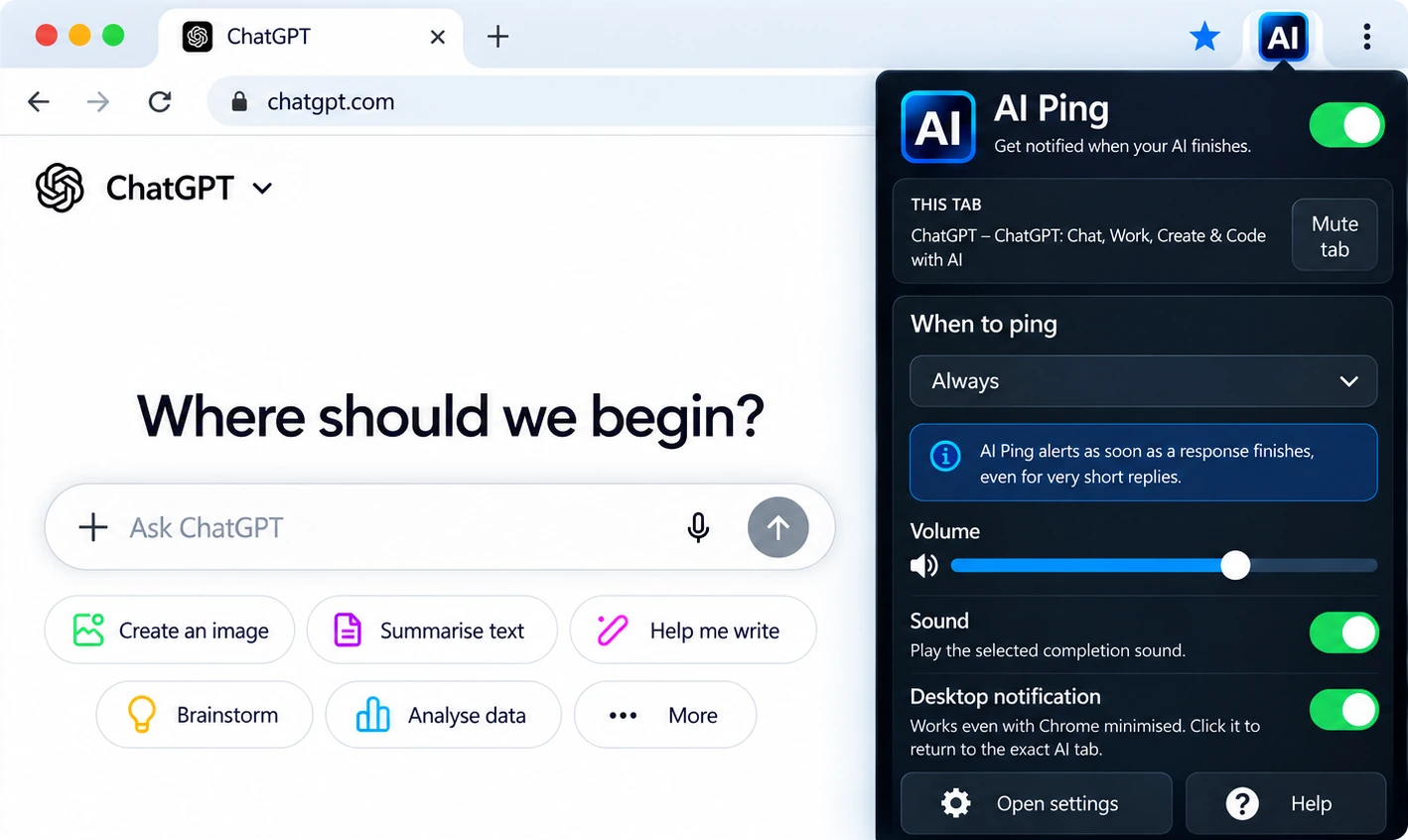
Hear a completion sound when an AI response finishes. Pick a sound and set the volume you like.
Stop babysitting tabs. AI Ping lets you get on with your day while ChatGPT, Claude, or Gemini works on your answer. We'll let you know when it's ready.
 ChatGPT
 Claude
 Gemini
Small, thoughtful features that make switching between AI chats and everything else feel effortless.
Hear a completion sound when an AI response finishes. Pick a sound and set the volume you like.
Get a notification even when Chrome is minimised. Jump back to the right conversation with a click.
A subtle green dot marks an unread finished response, so you know which tab needs you.
See how many finished AI responses are waiting for you on the AI Ping toolbar icon.
Mute individual AI conversations without switching off alerts for everything else.
Silence alerts during quiet hours and optionally get reminded about responses you haven't opened.
ChatGPTClaudeGeminiAI Ping works with your existing AI chats. No accounts to create, no workflow to relearn.
Open ChatGPT, Claude, or Gemini and send your question as normal.
Switch tabs, write code, or carry on browsing. AI Ping watches for the finished response.
 AI Ping
Hear the sound, see the finished tab, and go straight back when you're ready.
Preview the completion sound and notification. Real desktop notifications are displayed by Chrome and your operating system, so their appearance may vary.
AI Ping runs in your browser and doesn't require an AI Ping account or a separate cloud service. It checks supported AI pages for completion status and stores preferences locally.
Read our privacy informationAI Ping currently supports ChatGPT, Claude and Gemini in Chrome. You can turn each service on or off in the extension settings.
AI Ping can notify you while Chrome is minimised when notifications are enabled. Some AI services may delay exposing a completed response while their tab is in the background, particularly Gemini, so alerts can occasionally be delayed until you return to that tab.
English is the primary tested baseline. AI Ping also has language-independent detection paths, with improving compatibility for languages such as Japanese and Korean on ChatGPT. Support varies by service, interface version and response type. Check the changelog for tested scenarios.
Yes. AI Ping is currently free to install and use from the Chrome Web Store.
Yes. Open AI Ping while you're on a supported AI tab and use the per-tab mute option. You can still receive alerts from your other AI tabs.
No. AI Ping checks response status locally in your browser. It doesn't send your conversations to the AI Ping developer. See the privacy page for details.
Visit the support page to find troubleshooting tips and contact information.
AI Ping is free and built in my spare time. If it saves you a little time, you can optionally support its continued development. No subscription, no locked features, and no pressure.
Install AI Ping, get your focus back, and let us do the waiting.
